
The Complete Retrofit Guide: How to Add Wireless Charging to Any Side Table
Aug 23,2025 | Smart-Living
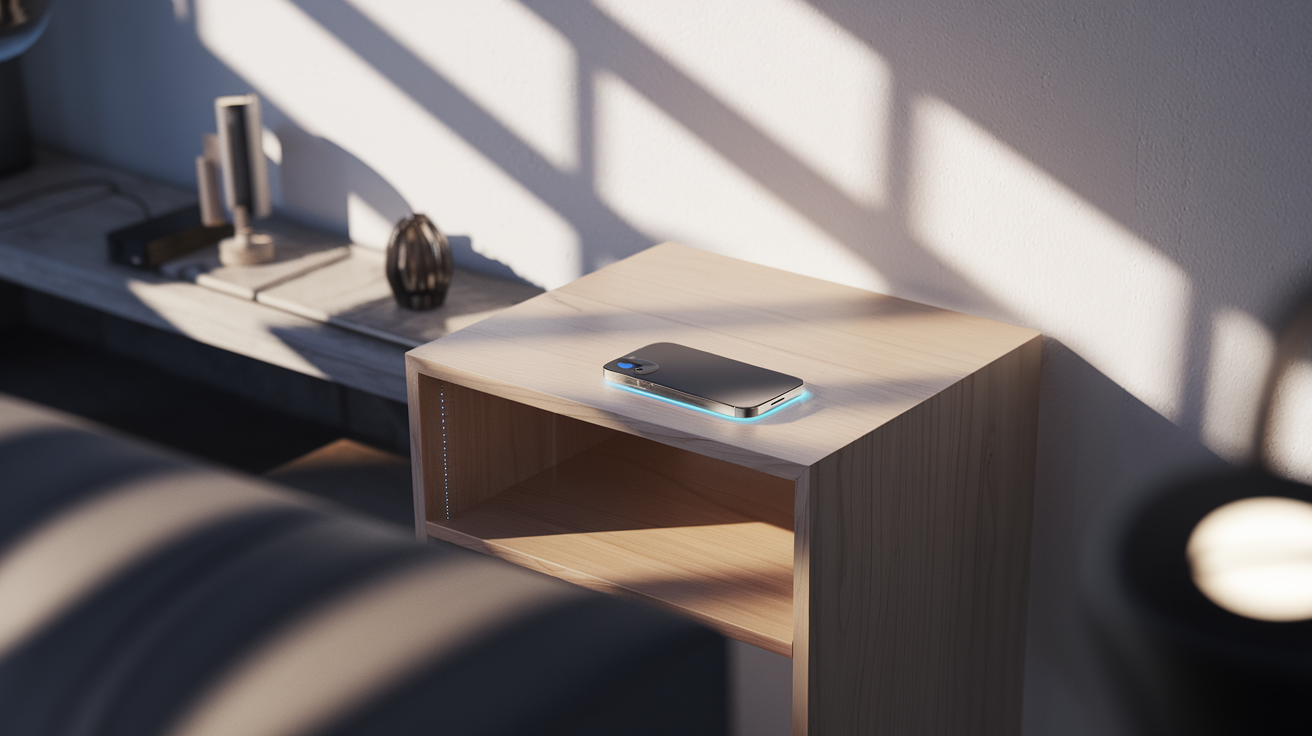
Table Of Contents
- Understanding Wireless Charging Technology
- Benefits of Retrofitting Your Side Table
- What You'll Need: Materials and Tools
- Choosing the Right Wireless Charger
- Measuring and Planning Your Installation
- Installation Methods
- Step-by-Step Installation Guide
- Troubleshooting Common Issues
- Enhancing Your Wireless Charging Setup
- Conclusion
We've all been there—fumbling with charging cables in the dark, managing tangled wires on nightstands, or searching for that elusive phone charger that seems to disappear when you need it most. What if your side table could solve these problems by becoming a wireless charging station, elegantly integrating technology into your home without visible cables or clutter?
Retrofitting your existing side table with wireless charging capability is easier than you might think, and it's a practical way to modernize your living space without replacing your furniture. Whether you're a DIY enthusiast looking for your next project or simply someone who wants a more convenient charging solution, this comprehensive guide will walk you through everything you need to know.
In this article, we'll explore different installation approaches based on your table type, skill level, and aesthetic preferences. From simple surface-mounted options that require minimal tools to more integrated solutions that create a seamless look, you'll discover how to transform ordinary furniture into smart furniture—at a fraction of the cost of buying new pieces.
The Complete Wireless Charging Table Retrofit Guide
Transform any side table into a smart charging station
Installation Methods Compared
Surface Mount
Difficulty: Easy
Flush Mount
Difficulty: Moderate
Under Mount
Difficulty: Moderate
What You'll Need
For flush mounting, also add:
Key Considerations
Table Thickness
Standard chargers work through surfaces up to 5-8mm thick. Specialized chargers can work through up to 30mm.
Material Compatibility
Works through wood, glass, and plastic. Metal tables or metal reinforcements will interfere with charging.
Phone Case Compatibility
Most cases work fine, but very thick cases (>5mm) or those with metal/magnetic components may reduce efficiency or block charging.
Quick Installation Guide (Surface Mount)
Clean the Surface
Thoroughly clean the mounting location with alcohol to remove oils and residue.
Position Charger
Mark the desired location with tape. Choose an area where you naturally place your phone.
Apply Adhesive
Apply double-sided mounting tape to the bottom of the charging pad.
Mount & Route Cable
Press firmly on charger to adhere. Route cable along table edge and down a leg using cable clips.
Common Issues & Solutions
Phone Not Charging
Slow Charging
Overheating
Upgrade Ideas
Add LED Indicators
Install a small LED that illuminates when a device is charging, especially useful for under-mount installations.
Multiple Charging Zones
Install several charging pads to accommodate multiple devices simultaneously, perfect for shared spaces.
Smart Plug Integration
Connect to a smart plug for voice control or scheduling, automatically turning off when not needed to save energy.
Understanding Wireless Charging Technology
Before diving into installation, it's important to understand the basics of how wireless charging works. Most wireless charging systems today use a technology called Qi (pronounced "chee"), which has become the industry standard.
Wireless charging operates through electromagnetic induction. When you place your phone on a wireless charger, an electromagnetic field transfers energy between the charging pad (transmitter) and your device (receiver). Your phone converts this energy into electrical power to charge the battery. The beauty of this system is that it works through surfaces like wood, glass, and plastic—making it perfect for furniture integration.
Most modern smartphones—including recent iPhone, Samsung, Google, and other Android devices—come with built-in Qi receivers, making them compatible with wireless charging pads without additional accessories. For older phones without this capability, you can use adapter cases or thin receiver pads that connect to your charging port.
The standard Qi chargers typically deliver 5-15 watts of power, with newer models offering faster charging speeds. This is sufficient for overnight charging on a bedside table or maintaining battery levels throughout the day at a desk or living room table.
Benefits of Retrofitting Your Side Table
Why go through the effort of adding wireless charging to your existing furniture? There are several compelling reasons:
Reduced clutter: Eliminating visible charging cables creates a cleaner, more organized space. This is especially valuable in small living areas where visual clutter can make rooms feel cramped.
Convenience: Simply place your phone on the table to charge—no more hunting for cables or plugging and unplugging devices. This small change can significantly streamline your daily routines.
Cost-effective: Retrofitting costs a fraction of what you'd pay for pre-built furniture with integrated charging. A quality wireless charger typically costs $20-50, compared to hundreds for new smart furniture.
Sustainability: Updating your existing furniture rather than replacing it reduces waste and extends the life of pieces you already own and enjoy.
Customization: You can choose exactly where and how to install the charger based on your specific needs and usage patterns, unlike pre-built options with fixed charging locations.
What You'll Need: Materials and Tools
The specific materials needed will vary depending on your installation method, but here's a comprehensive list to get you started:
Essential materials:
- Qi wireless charging pad or module (we'll discuss selection criteria shortly)
- Power adapter for the charging pad
- Cable management solutions (clips, channels, or raceways)
- Double-sided mounting tape or adhesive (for surface mounting)
- Drill with appropriate bits (for flush or under-mounting)
- Hole saw or jigsaw (for flush mounting)
- Measuring tape and pencil
- Sandpaper (various grits)
Optional tools and materials:
- Router (for creating custom insets)
- Wood glue or epoxy
- Clear polyurethane finish
- Cable extenders if needed
- Silicone or rubber gasket material
- Smart plug for remote control capabilities
Don't worry if you don't have all these tools—we'll cover alternative approaches for different skill levels and tool availability.
Choosing the Right Wireless Charger
Selecting the appropriate wireless charger is crucial for a successful installation. Here are the key factors to consider:
Form factor: Wireless chargers come in various shapes and designs. For furniture integration, look for:
- Slim puck-style chargers: These circular units are ideal for flush mounting in tables
- Square or rectangular pads: Often easier to install in corners or against edges
- Furniture-specific chargers: Some are designed specifically for mounting under surfaces
Charging power: Standard wireless chargers deliver 5W of power, while faster models offer 10W, 15W, or even 20W+ for compatible devices. Higher wattage means faster charging but may generate more heat.
Surface compatibility: Check the maximum thickness the charger can work through. Most consumer-grade chargers work through surfaces up to 5-8mm thick, but specialized furniture chargers can work through thicker materials (up to 30mm in some cases).
Cable length: Ensure the power cable is long enough to reach from your table to the nearest outlet, or plan to use an extension.
Safety features: Look for chargers with overheat protection, foreign object detection, and surge protection, especially for permanent installations.
At Smart Living's smart home collection, you'll find several wireless charging options designed for furniture integration that meet these criteria. Their products offer excellent value compared to other premium retailers while maintaining high-quality standards.
Measuring and Planning Your Installation
Proper planning prevents poor performance. Before making any cuts or permanent modifications, take these preparatory steps:
Assess your table: Examine the material, thickness, and construction of your side table. Solid wood tables are ideal for modifications, while veneered, laminate, or glass tables require more careful approaches.
Determine the ideal location: Consider where you naturally place your phone when using the table. The most convenient spot is usually toward the back edge or in a corner, leaving the rest of the surface free for other items.
Test the charging capability: Before installation, place your charger on the underside of the table surface and your phone on top to verify the charging works through the material. If it doesn't, you may need a more powerful charger or a different installation method.
Plan the power route: Determine how the power cable will run from the charger to the nearest outlet. Look for opportunities to hide the cable along table legs or behind other furniture.
Mark the installation location: Use painter's tape and a pencil to mark your intended charger location, ensuring it's properly aligned and positioned where you want it.
Installation Methods
There are three primary ways to integrate a wireless charger into your side table, each with different levels of complexity and visual results:
Surface Mount Installation
This is the simplest approach, requiring minimal tools and no permanent modifications to your furniture.
Pros:
- No cutting or drilling required
- Completely reversible
- Can be completed in minutes
- Works with any table material
Cons:
- Charger remains visible on the surface
- May create a slight bump on the table
- Less aesthetically integrated
Best for: Renters, those with limited tools, valuable antique furniture, or as a temporary solution.
Flush Mount Installation
This method involves creating a recess in your table surface where the charger sits perfectly flush with the top.
Pros:
- Provides a clean, integrated appearance
- Charger won't shift or move
- Maintains a flat, usable surface
Cons:
- Requires more tools and skills
- Permanently alters the furniture
- Works best with solid wood tables
Best for: DIY enthusiasts with basic woodworking skills and tools who want a professional-looking result.
Under-Mount Installation
This approach places the charger completely hidden beneath the table surface with no visible components.
Pros:
- Completely invisible installation
- No alteration to the table surface
- Maintains the original look of the furniture
Cons:
- Requires a table with appropriate thickness
- Charging efficiency may be reduced
- May need to mark the charging spot
Best for: Tables with thinner tops (under 1cm for standard chargers) and users who prioritize aesthetics.
Products from Smart Living's office collection include specialized under-mount chargers designed to work through thicker surfaces than standard consumer models.
Step-by-Step Installation Guide
Let's walk through the process for each installation method, starting with the simplest:
Surface Mount Installation:
- Clean the table surface thoroughly with alcohol to remove any oils or residue.
- Position your wireless charger in the desired location.
- If your charger doesn't have built-in adhesive, apply double-sided mounting tape to the bottom of the charger.
- Carefully place the charger on your marked location and press firmly.
- Route the power cable to the nearest outlet, using cable clips or guides to secure it neatly along the table edge and down a leg.
- Optional: Use a smart plug from Smart Living's appliance collection to add scheduling or voice control to your charging pad.
Flush Mount Installation:
- Measure your wireless charger's dimensions precisely.
- Mark the installation location on the table surface.
- Create a template using cardboard or paper that matches your charger's shape.
- Secure the template to the table with painter's tape.
- Drill a starter hole within your marked area.
- Using a hole saw (for circular chargers) or jigsaw (for other shapes), carefully cut out the recess, making it slightly larger than your charger.
- Measure the depth of your charger and use a router or chisel to create a recess of matching depth.
- Sand the edges and interior of the recess.
- Test fit the charger to ensure it sits flush with the surface.
- Apply a thin bead of silicone adhesive around the bottom edge of the recess.
- Insert the charger and press it into place.
- Wipe away any excess adhesive.
- Route and secure the power cable as in the surface mount method.
- Allow 24 hours for the adhesive to cure before use.
Under-Mount Installation:
- Confirm that your charger works through the table material by testing before installation.
- Mark the desired charging location on the underside of the table.
- Clean the underside surface thoroughly.
- Apply strong double-sided tape or adhesive to the top of the charger.
- Align the charger with your marked location on the underside of the table.
- Press firmly and hold for 30-60 seconds to ensure adhesion.
- For added security, you can create a small bracket or harness to hold the charger in place.
- Route and secure the power cable using cable management solutions.
- On the table's top surface, add a small marker (like a subtle sticker or engraved symbol) to indicate where to place devices for charging.
Pro tip: For all installation methods, test the charger thoroughly before finalizing the installation. Place your phone on the charging spot and confirm it charges properly before applying permanent adhesives or making irreversible cuts.
Troubleshooting Common Issues
Even with careful planning, you might encounter some challenges. Here are solutions to common problems:
Phone not charging:
- Surface too thick: If using under-mount method, your table might be too thick for the charger. Consider switching to a flush mount approach or purchasing a more powerful charger designed for furniture.
- Metal interference: Metal components in the table can interfere with charging. Ensure there's no metal between the charger and your phone.
- Positioning issues: Qi charging requires alignment between the transmitter and receiver coils. Add a visible marker on the surface to help with phone placement.
Slow charging:
- Power supply: Ensure your charger is using the appropriate power adapter—some require specific voltage/amperage for optimal performance.
- Material thickness: Thicker surfaces reduce charging efficiency. Consider switching to a flush mount if charging is too slow.
- Phone case interference: Very thick or metal-infused cases can reduce charging speed or prevent charging entirely.
Overheating:
- Ventilation: Wireless chargers generate heat. If using an under-mount installation, ensure adequate airflow around the charger.
- Quality issues: Lower-quality chargers may overheat more easily. Consider upgrading to a more reliable model from Smart Living's collection.
- Continuous use: If the charger feels excessively hot after prolonged use, consider adding a smart plug to automatically turn it off after a few hours.
Enhancing Your Wireless Charging Setup
Once you've successfully installed your wireless charger, consider these upgrades to further improve functionality:
Add visual indicators: For under-mount installations where the charger is invisible, consider adding a small LED that illuminates when a device is charging. These can be wired to the charger's power indicator.
Multiple charging zones: For larger side tables or desks, install multiple charging pads to accommodate several devices simultaneously. This is perfect for households where multiple family members might need charging access.
Integrate with home automation: Connect your charging pad to a smart plug that can be controlled via voice commands or scheduled to turn on/off at specific times, saving energy when not in use.
Add USB ports: Consider installing additional USB ports alongside your wireless charger for devices that don't support wireless charging. Some integrated units offer both capabilities.
Enhance aesthetics: For flush-mounted installations, consider adding decorative inlays or patterns around the charger to make it a design feature rather than just a functional element.
Many of these enhancements can be found in Smart Living's smart home collection, which features products designed to work together in integrated systems.
Conclusion
Retrofitting your side table with wireless charging capability is a relatively simple project that can significantly enhance your living space's functionality. By eliminating cable clutter and creating a dedicated charging spot, you're bringing smart home convenience to your existing furniture at a fraction of the cost of buying new smart furniture.
Whether you chose the simple surface-mount approach, the integrated flush mount, or the invisible under-mount method, you've successfully modernized your side table while maintaining its core aesthetic and purpose. The beauty of this retrofit is that it's customizable to your specific needs and skill level.
As wireless charging technology continues to advance, the efficiency and capabilities of these systems will only improve. Your retrofitted side table positions you to take advantage of these improvements simply by upgrading the charger component when needed, without replacing the entire piece of furniture.
Remember that the most successful smart home upgrades are those that seamlessly integrate into your daily life, providing convenience without calling attention to themselves. Your newly upgraded charging table achieves exactly that balance—technology that serves you without disrupting your home's comfort and style.
Ready to upgrade more aspects of your living space? Explore Smart Living's complete collection of premium quality smart home products at transparent, competitive prices. From wireless charging solutions to complete smart home systems, we offer exceptional essentials without the retail markup.